Would you hand your laptop over to a stranger in a cafe? Using public Wi-Fi can be just as risky. Here’s what Monachus is doing.
For professionals working with private or sensitive data, like us here at Monachus, connecting to public Wi-Fi without proper precautions presents a huge security risk. Public networks in cafés, hotels, airports, and coworking spaces are convenient, but they are often not designed with strong security controls in place to protect you or your data.
As the growing work trend has people choosing hybrid/remote work environments, understanding the risks of public networks and knowing how to use them safely is essential to protecting company and client data.
The Risks of Public Wi-Fi
When connecting to public Wi-Fi, users rely entirely on the network’s security configuration. These environments are pretty risky because many unknown devices share the same network.
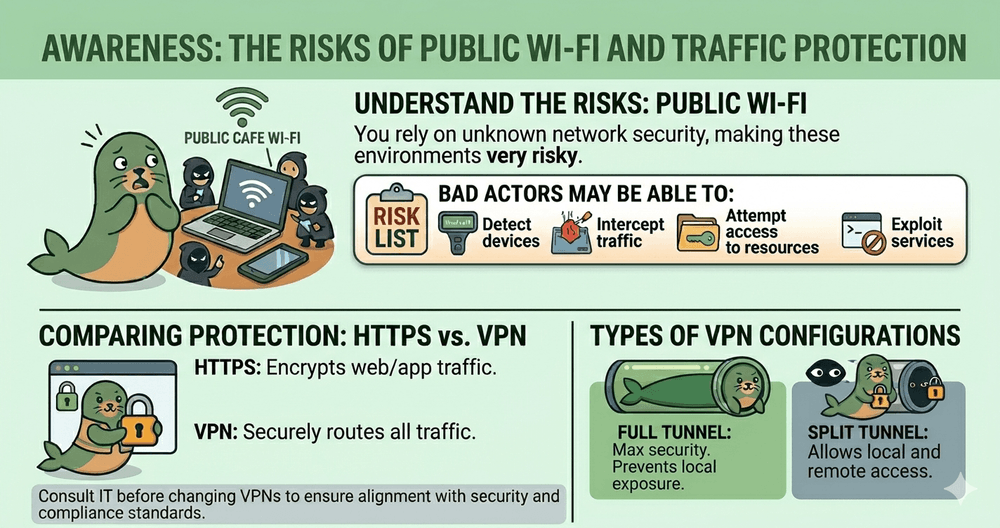
If proper protections are not in place, bad actors may be able to:
Detect all connected devices on a network
Inspect network traffic
Attempt access to shared resources
Exploit unprotected services or misconfigured systems
While modern websites often use HTTPS encryption, not all application traffic is secure by default. Background services, outdated apps, or improperly configured systems may still transmit data without encryption, leaving it vulnerable to interception!
Rogue Networks and “Evil Twin” Attacks
Another major threat comes from rogue access points, commonly known as Evil Twin attacks. In these cases, attackers create fake Wi-Fi networks that mimic legitimate public networks.
These networks often look authentic and even provide real internet access, typically by routing traffic through the attacker’s own router. Because they work like any other Wi-Fi network, users often cannot tell the difference.
Once connected, all device traffic flows through the attacker, allowing them to access your unencrypted data. Even when HTTPS is in use, users who ignore browser warnings or use misconfigured applications may still expose sensitive information.
How your Internet Traffic is Protected
Both HTTPS and VPN technologies help protect data, but they function differently.
HTTPS
Protects data between a browser or app and a specific website
Encrypts website traffic so outsiders can see the destination but not the content
Widely used across modern web services
Does not protect non-web traffic or prevent local network exposure
VPN
Encrypts all network traffic by routing it through a secure tunnel
Protects both web and non-web traffic
Reduces visibility of device activity to others on the same network
May be unnecessary for simple browsing but valuable in higher-risk scenarios
Types of VPN Configurations
Not all VPNs provide the same level of protection. Choosing the right one isn’t always as straightforward as it seems. Features, configurations, logging policies, and deployment methods can vary significantly from provider to provider. That’s why it’s important to check in with your IT department before adopting or changing any VPN solution. They can help determine what aligns with your organization’s security standards, compliance requirements, and day-to-day workflows.
If your team is still evaluating options or trying to determine what makes the most sense for your environment, that’s completely normal. VPN strategy should be intentional, not reactive. If you’d like guidance on what to look for, how to assess risk, or how to implement a solution effectively, feel free to book a consultation with us. Monachus is happy to share recommendations and help you build an approach that supports both security and productivity.
Full Tunnel VPN
Routes all traffic through the VPN
Prevents exposure on local networks
Offers the highest level of security
Split Tunnel VPN
Sends only selected traffic through the VPN
Allows local network access
Introduces risk on public networks since the device may still be visible to others
Final Thoughts from us at Monachus
So, imagine you’re working from a cafe. You’re answering emails and reviewing sensitive documents when someone taps you on the shoulder and asks to borrow your laptop. You refuse without hesitation, right? Of course you do!
Yet, most of us don’t think about how willingly we are to connect to public Wi-Fi networks. Which pose the same risks.
Public networks are convenient, yes. But again, they aren’t built with security in mind. Which is why using a VPN is one of the strongest ways to protect sensitive information when connecting to public networks. Modern HTTPS protections in addition to cloud based tools have cut out some risks to everyday browsing, they don’t eliminate them entirely.
At Monachus, all our devices benefit from the extra layer of DNS filtering running in the background, which helps us block access to malicious sites when researching or a simple Google search.
Having awareness and good security habits matter! Public Wi-Fi should always be treated as untrusted, and professionals must take simple precautions to keep everyone’s data safe, wherever the work happens.